
It is the eighth over, you have just moved money across, and you now have a cricket id deposit stuck somewhere between a UPI confirmation screen and a balance that has not changed. The app says one thing, the site says another, and the obvious instinct is to tap pay again. That instinct is usually the expensive one. What you are actually dealing with is a payment-tracing problem: a transfer that exists in your bank’s records but has not yet been matched to an account on the other side.
This breakdown covers what a UTR is, how to read the real status, which records to save in the first few minutes, and how the normal resolution process works — written from a football-watching outsider’s view of these cricket ID setups, with no platform to sell you.
Table of Contents
Cricket ID Deposit Stuck: The First 30 Minutes
The half hour after a payment goes quiet decides how messy the rest of the week is. Most people spend it refreshing the balance page and messaging whoever added them on chat. The useful version of that half hour is spent collecting evidence instead, because a transfer that cannot be identified by reference cannot be traced by anyone — not your bank, not the receiving account’s bank, not a support desk.
The sequence below is deliberately boring. It assumes nothing about who is on the other end and does not require you to trust anybody’s word about what happened. Work through it once, slowly, before you send a single message.
- Open your bank or UPI app, not the site. The site’s balance is a downstream display. Your bank’s transaction list is the record that matters.
- Find the transaction and read its exact status. Success, Failed, Pending and Reversed are four different situations with four different outcomes.
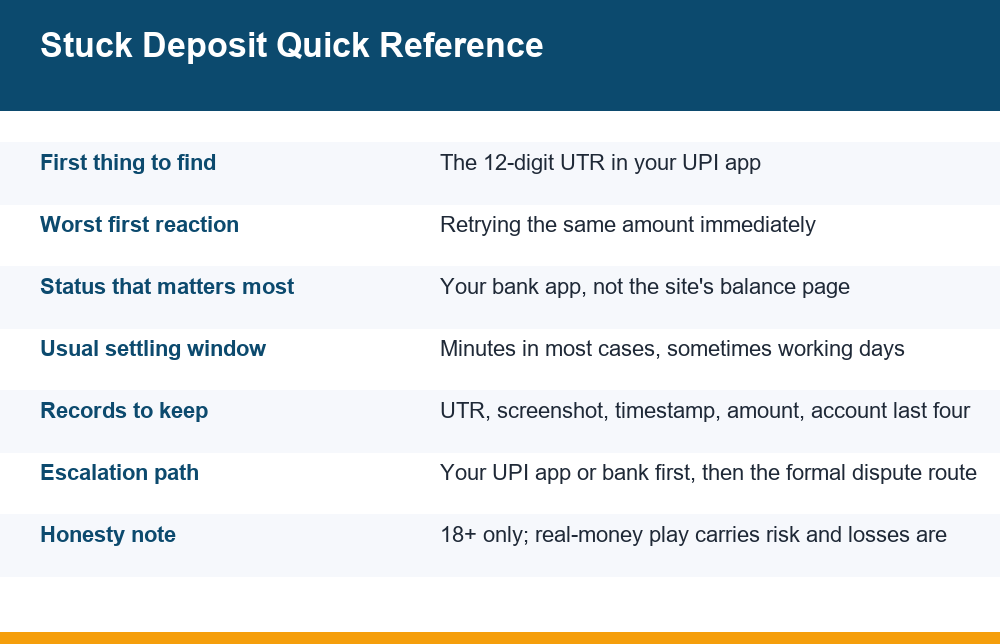
- Copy the UTR. It is the 12-digit reference attached to the payment. Save it somewhere outside the app, in a notes file or a message to yourself.
- Screenshot the full detail view. Include the amount, the timestamp, the status line, the UTR and the receiving account or VPA exactly as shown.
- Check whether your money actually left. Compare your available balance against what it was before. A debit that never happened needs no dispute at all.
- Wait before doing anything else. Give the system time to settle on its own before you add a second transaction to the picture.
Notice that none of those six steps involves paying again. Everything you need in order to resolve a stalled transfer already exists at the moment it stalls. Adding another payment does not retrieve the first one; it only creates a second item that has to be traced separately.
There is a reason the order runs evidence first and communication second. Once you start a chat thread, the conversation tends to set the agenda: you answer questions, you get asked to try things, and the original screen gets closed somewhere along the way. Thirty minutes of quiet record-keeping leaves you holding the facts rather than reconstructing them.
If the whole thing resolves on its own within that window, which is common, you have lost nothing but a few minutes. If it does not, you now have a complete record instead of a vague memory of a screen you closed.
What A UTR Number Actually Is
UTR stands for Unique Transaction Reference. It is a 12-digit identifier generated when a payment is pushed through the interbank system, and it belongs to the transfer itself rather than to you or to the recipient. Think of it as the tracking number on a parcel: it does not prove the parcel contained what you think it contained, but it lets any party in the chain look up where it currently is.
That distinction matters more than people expect. A UTR confirms that a specific amount moved from a specific account at a specific moment with a specific destination attached. It does not confirm that the destination credited it to the account you believe you were funding. Those are two separate facts, and conflating them is the root of most arguments between a player and a support desk.
You will usually find the UTR inside the transaction detail view of your UPI app, sometimes labelled UPI reference number, RRN or transaction ID. Some apps show a 12-digit string, some show a longer internal order ID alongside it. The 12-digit one is the one that travels across banks. If you only save a screenshot of the summary tile rather than the detail view, you often end up without it.
It helps to separate the reference numbers you may be handed from the one that actually travels. A UPI app may generate its own order ID. A receiving platform may issue a ticket number. Neither of those exists in your bank’s records, which is why neither can be used to look the payment up from the banking side. Only the 12-digit reference crosses between institutions, and that is the whole reason a cricket id deposit stuck in reconciliation is traceable at all.
A small habit pays off here: save the reference as plain text in the same place every time, not inside a screenshot gallery. A number you can paste into a search field is usable; a number you have to read off an image and retype is a source of typos, and a single wrong digit turns a lookup into a dead end.
One more practical point: a UTR is not sensitive in the way a card number or a one-time code is, but the screenshot around it often is. Crop out anything you do not need to share, and never send a full account statement to someone who contacted you first on a messaging app.
Reading Success, Failed And Pending Correctly
The single most common reason a cricket id deposit stuck situation turns into a long argument is that two people are reading two different status screens and both believe theirs is definitive. Your app reports what your bank knows. The site reports what its own reconciliation system has matched. Those can legitimately disagree for a while.
| Status in your app | What it usually means | What it does not mean |
|---|---|---|
| Success | The amount left your account and was accepted by the receiving bank | That any particular user account was credited |
| Pending or Processing | The transfer is still moving through the system and has no final outcome yet | That the money is lost or that a second attempt is needed |
| Failed | The transfer did not complete; a debit, if taken, is normally reversed automatically | That you should immediately re-send to a different destination |
| Reversed | An earlier debit has been returned to your account | That the original attempt also succeeded somewhere |
| Debited with no status | The app has not caught up; the ledger entry is still the authority | That nothing can be traced without a status label |
Read the table as a translation exercise rather than a diagnosis. The pattern worth internalising is that Success on your side is the beginning of a trace, not the end of one. When a transfer shows Success and the balance on the other side has not moved, the question is no longer whether money left — it is which account it landed against.
It is also worth checking the status twice rather than once. A single reading tells you where things stood at one moment; two readings a few hours apart tell you whether the entry is moving. An item that has gone from Pending to Success has resolved itself on the rails, and the remaining question is matching. An item sitting on the same label all day is the one worth raising.
Pending is the status people handle worst. It feels like nothing is happening, so they act. In reality a pending entry is the system telling you it has not decided yet, and decisions in payment systems are allowed to take time. Treat Pending as a hold instruction directed at you.
Why Retrying Immediately Is The Classic Mistake
Retrying a stalled payment is attractive because it feels like action, and because the match is still running. It is also the move that converts a one-line problem into a three-line problem. The first transfer does not disappear when you make a second one; it keeps travelling through the same system on its own schedule.
There are three predictable consequences. First, you can end up with two identical amounts in flight, which makes automated matching harder rather than easier, because the receiving side now has to decide which transfer corresponds to which request. Second, your own available balance drops by twice what you intended, which is exactly the situation that pushes people into bad decisions during a live game. Third, repeated identical attempts from one account inside a short window can look like an error loop to risk systems, and those systems respond by slowing things down, not speeding them up.
The timing pressure is worth naming honestly, because it is the real mechanism at work here. Nothing about a stalled transfer is improved by resolving it before the innings ends. The urgency is yours, not the payment system’s. Recognising that gap is most of the discipline required.
Load patterns make this worse at predictable moments. Big fixtures concentrate enormous numbers of transfers into the same few minutes, and the same crunch shows up on the way out as well — the dynamics behind withdrawal delays during peak match traffic are the mirror image of the deposit queue you are sitting in. If a transfer stalled during a chase or a final over, congestion is a far more likely explanation than anything dramatic.
A reasonable rule of thumb: do not send a second payment of the same amount to the same destination on the same day unless the first one has reached a terminal status you can see in your own bank records. Anything short of that is guessing with your own money.
The Records Checklist Before You Contact Anyone
Whoever eventually looks into this will ask for specifics. Having them ready shortens the process considerably and, just as usefully, protects you from being talked out of a factual position later. Collect these while the screens are still open.
- The 12-digit UTR, typed out as text somewhere you control, not only inside a screenshot.
- Exact amount, including paise if any, since partial-amount mismatches are a real cause of failed matching.
- Date and time to the minute, in your own timezone, as shown in the bank app.
- Status at the moment you looked, plus a second check a few hours later so you can show whether it changed.
- Destination as displayed — the VPA, account last four digits or merchant name shown in the transaction detail.
- Your own identifier on the receiving side, whatever reference or username the deposit was supposed to be matched against.
- A clean screenshot of the full detail view, cropped so it shows the transaction and nothing else from your account.
Keep all of it in one place rather than scattered across a chat history. A folder, a single notes entry, anything you can retrieve in ten seconds a week from now. Disputes drift; memories of exact amounts drift faster.
Dates matter as much as amounts. Write down when you first noticed the problem, when you checked the status again, and when you reported it and to whom. A short chronology is unglamorous, and it is the thing that holds up when two accounts of events disagree weeks later.
One caution about the destination field, because it is where the picture sometimes changes. If the transfer went to a personal account or an individual VPA rather than anything resembling a business payment destination, the trace is still possible but the situation you are in is different from a simple reconciliation lag. That pattern sits on the same list as the other warning signs that a cricket ID arrangement is not what it claims to be, and it is worth reading that way rather than assuming a technical glitch. This is explained here to help you spot it, not to steer you anywhere.
Where The Money Sits While A Transfer Is Unsettled
People imagine money vanishing into a void. In practice an unsettled transfer is always in one of a small number of places, and knowing which one you are dealing with tells you who can act.
It may still be with your own bank, debited from your available balance but not yet released — in which case the entry often reverses on its own. It may be in transit through the interbank switch, which is where genuine pending status lives. It may have been accepted by the receiving bank but not yet matched by the receiving platform’s internal ledger, which is the most common cause of a visible gap between a Success screen and an unchanged balance. Or it may have been credited to an account other than the one you expected, which is the only version that needs a human to go looking.
The reason this matters is that each location has a different natural resolution time and a different responsible party. Asking a support desk to fix a transfer that is still inside the interbank switch achieves nothing, and asking your bank to adjust a platform’s internal ledger is equally pointless. Diagnose first, then ask the party that can actually act.
The difference between a debit and a hold is worth understanding too, because it changes what you are looking at. An amount shown as debited is not always finally settled; it can sit as an entry that has still to clear, and your available balance can differ from your ledger balance while that is true. If the figure on your statement and the figure on your home screen disagree, that difference is usually the unsettled item rather than an error.
Where the funds ultimately land also depends on which kind of product you were funding, because wallets for instant colour-and-number style games and balances for match markets are often reconciled by completely separate systems inside the same brand. That split is the same one behind the differences covered in this comparison of instant-game and sportsbook cash-out behaviour, and it explains why two deposits made minutes apart can behave nothing alike.
Tracing Money Debited But Not Credited
When an amount has clearly left your account and the clock has run past the point where an automatic reversal would normally have happened, the trace moves from waiting to asking. The order of operations here is the part most affiliate pages skip, because it does not end with a link to click.
Start with the app you paid from. UPI apps carry a built-in complaint or raise-issue option inside each transaction’s detail view, and that route attaches your UTR automatically, which is exactly why it is the cleanest first move. If that path is unavailable or returns nothing useful, your own bank is next, since it holds the originating record and can see what the switch reported back.
There is a defined, layered process behind all of this rather than ad hoc goodwill: complaints raised through a payment app or bank move through recognised handling levels, and the operator of the underlying rails publishes an outline of that structure in its own published grievance redressal structure. Reading the official description once is worth more than a dozen summaries, because timelines and steps get repeated inaccurately across blog posts.
Two things to hold onto while a trace is open. The UTR is what makes you credible — a complaint without a reference is a story, a complaint with one is a lookup. And a transfer that completed successfully to the destination you yourself approved is a matching question, not a reversal question; expecting the payment system to undo an authorised transfer because the other side did not credit it sets you up for frustration.
Expect the process to be slower than the problem feels. A trace moves at the pace of whichever institution is holding the item, and chasing the same complaint through three different channels at once usually produces three partial answers rather than one complete one. Pick the channel attached to your UTR, let it run, and keep whatever reference number it gives you alongside the original.
A brief honesty note that belongs in any piece like this: real-money play is strictly for adults, it carries real financial risk, and across any meaningful number of sessions losses are the expected outcome. Nothing in a payment process changes that arithmetic.
What Support Needs To Find A Missing Deposit
A support desk searching for an unmatched credit is essentially running a query. Give it good inputs and it returns something; give it “my deposit is missing” and it returns a request for the inputs. Send the following in a single message rather than drip-feeding over an hour.
- The UTR, as plain text so it can be pasted into a search field.
- The exact amount and the date and time of the debit.
- The account identifier the deposit was meant to credit, written exactly as it appears on your side.
- The payment method and app used, since routing differs between them.
- The current status in your bank app, quoted rather than paraphrased.
- One cropped screenshot of the transaction detail view.
Equally important is what not to send. No full bank statements, no login credentials, no one-time passwords, no screen-sharing sessions, no remote-access tools, and no card details. A legitimate reconciliation query never requires any of those, and a request for them tells you something useful about who you are talking to. Anyone insisting that a “verification deposit” or an extra fee is needed to release a stuck amount is describing a mechanic that exists to extract more money, not to return yours.
Tone is worth a sentence of its own. A message that opens with the reference, the amount and the timestamp gets handled as a lookup. A message that opens with frustration gets handled as a complaint, and complaints tend to queue behind lookups. That is not a comment on fairness; it is simply how a queue sorted by actionability behaves, and it costs nothing to use that to your advantage.
Keep the thread factual and dated. If the matter goes further, a short chronological record of what you reported and when will matter far more than tone.
Mistakes To Avoid While You Wait
Most of the damage in a cricket id deposit stuck episode happens in the waiting period rather than at the moment of the glitch. The failure mode is almost always the same: discomfort with an unresolved screen leads to additional actions that each create their own trail.
Do not pay a second time to a different destination because someone in a chat suggests the first one was “the wrong channel”. Do not accept a replacement reference number in place of your own UTR; yours came from your bank and cannot be substituted. Do not delete the transaction notification or clear the app’s history to tidy things up. Do not chase the amount with larger stakes once it does arrive, which is the point where a payment problem quietly becomes a spending problem.
Two softer mistakes are worth naming as well. One is moving the conversation into a private messaging thread where nothing is recorded on either side, which suits everybody except you. The other is giving up on the record because the amount feels too small to bother with — small amounts are exactly the ones that go unreconciled quietly, and a reference number costs nothing to keep.
And do not let a running match set your deadline. The deposit either resolves or it becomes a documented trace; neither outcome is improved by being handled in the final two overs. If the pressure to resolve it quickly feels disproportionate to the amount, that reaction is itself worth noticing, and free, confidential support for gambling-related stress exists independently of any platform.
The calm version of this whole process is unglamorous: find the reference, read the real status, save the record, wait the system out, then ask the one party who can actually act. It resolves the large majority of cases without a single extra rupee leaving your account — which is precisely why pages selling you something rarely lead with it.
Frequently Asked Questions
Why is my UPI deposit not credited to my betting ID?
In most cases the transfer completed on the payment rails but has not yet been matched to your account on the receiving side. That reconciliation step is separate from the transfer itself, which is why your app can show Success while the balance you expected to see has not moved. Less often the amount is still genuinely in transit, or it was credited against a different identifier than the one you were using. Checking your bank app’s status and keeping the UTR tells you which of those you are dealing with.
What is a UTR number in a UPI payment?
UTR stands for Unique Transaction Reference: a 12-digit identifier created for the transfer when it moves through the interbank system. Some apps label it UPI reference number or RRN. It belongs to the payment rather than to you, and it is what lets any bank or payment provider look up where that specific amount currently stands. You will normally find it in the transaction detail view rather than the summary list, so save it as text and not only as a screenshot.
How long does a pending UPI transaction take to resolve?
Many pending entries settle within minutes and most reach a final status well before the day is out, though some take longer and roll over into the next working days, especially around weekends, holidays and heavy traffic periods. Published timelines get quoted inconsistently across websites, so treat figures in blog posts with caution and read the official dispute redressal description from the operator of the UPI rails for the current process. The practical point is that pending means undecided, not lost.
Should I retry a deposit that still shows processing?
No. A processing entry is still live, and a second payment does not retrieve or cancel the first one. You end up with two identical amounts in flight, which makes automated matching harder, doubles the money out of your available balance, and can trip risk checks that slow everything down further. Wait until the first attempt reaches a status you can see in your own bank records before sending anything else.
How do I trace money that was debited but not credited?
Begin inside the app you paid from: UPI apps include a raise-issue or complaint option attached to each transaction, which carries your UTR automatically. If that route gives you nothing, go to your own bank, which holds the originating record. Complaints raised this way move through a defined layered process operated on the UPI rails, and reading the official outline of that mechanism once will tell you more than any summary. Keep the UTR, amount, timestamp and status together throughout.
What details does support need to find a missing deposit?
Send the 12-digit UTR as plain text, the exact amount, the date and time of the debit, the account identifier the deposit was meant to credit, the app or method used, the current status as shown in your bank app, and one cropped screenshot of the transaction detail. Send it in a single message. Never send login credentials, one-time passwords, full statements, card details or remote-access permission, and treat any demand for an extra fee or a verification deposit to release stuck funds as a warning sign rather than a procedure.